What Is RAG? Retrieval-Augmented Generation Explained Step by Step
Ask a general AI chatbot about your company’s refund policy, last month’s sales numbers or the notes from yesterday’s meeting, and it will either admit it does not know or, worse, invent a confident answer. The model was never trained on your information.
Retrieval-augmented generation, usually shortened to RAG, fixes that. It lets an AI model look up the right information from your own documents at the moment you ask, and then answer using that information. RAG is the technology behind most “chat with your PDF”, company knowledge base and customer support bots. This guide explains what RAG is, how it works step by step, when to use it instead of fine-tuning, how to build one, and the mistakes that make RAG systems give bad answers.
What Is RAG in Simple Words?
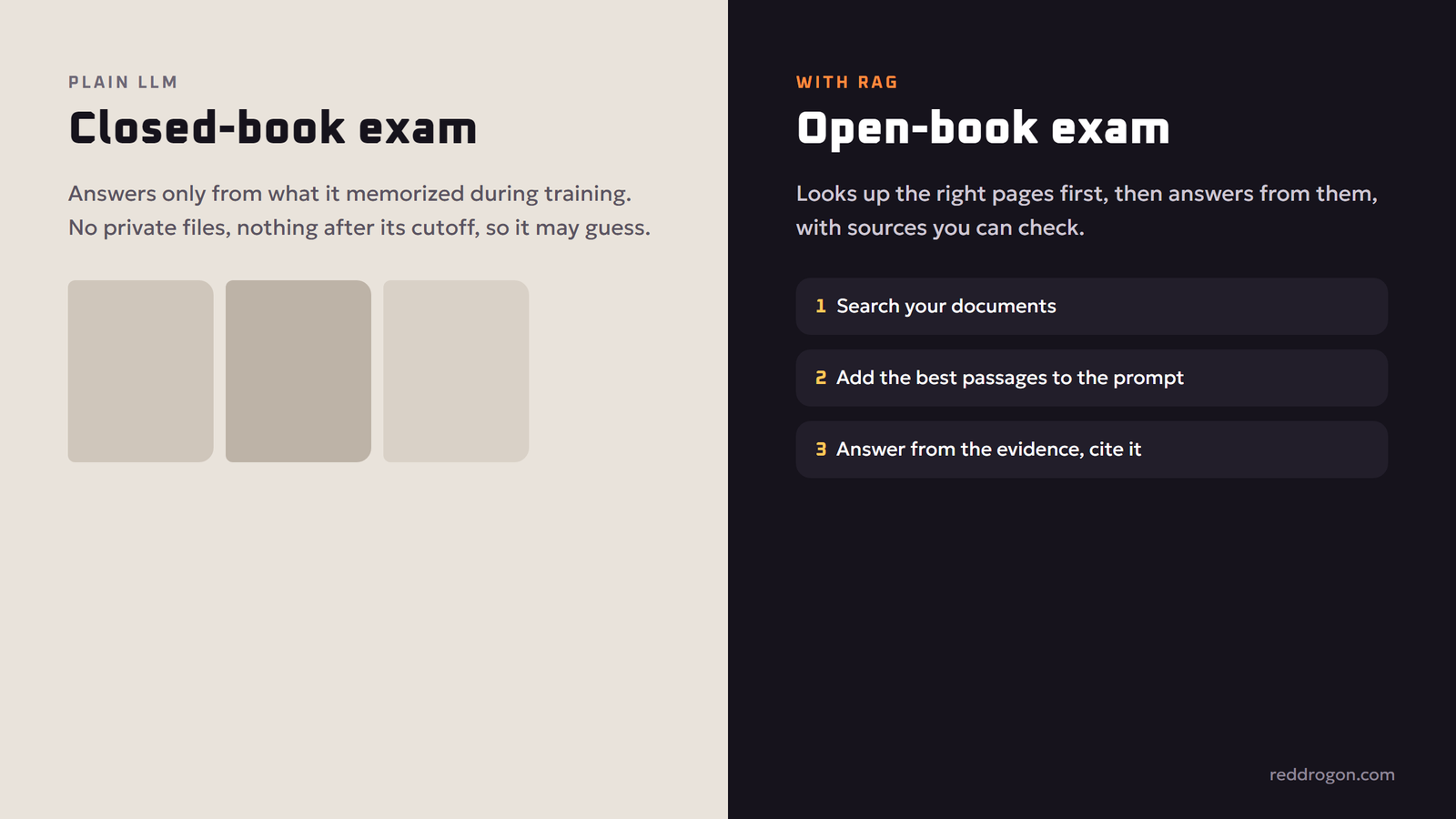
RAG is an open-book exam for AI. A normal language model answers from memory, meaning whatever it learned during training. A RAG system first searches a library of trusted documents for the passages most relevant to your question, places those passages into the prompt, and asks the model to answer using them.
The name describes the three parts:
- Retrieval: find the relevant pieces of information.
- Augmented: add those pieces to the prompt as context.
- Generation: let the language model write the answer based on that context.
The approach was described in a 2020 research paper by Patrick Lewis and colleagues, Retrieval-Augmented Generation for Knowledge-Intensive NLP Tasks, and has since become a standard pattern for business AI. Cloud providers such as AWS and research groups such as IBM Research publish good introductions if you want a second explanation.
Why RAG Matters
Language models have three limits that RAG directly addresses:
- Knowledge cutoff. A model only knows what was in its training data up to a certain date. RAG adds fresh information without retraining.
- Private knowledge. Your contracts, product manuals, policies and emails were never in public training data. RAG gives the model access to them, under your control.
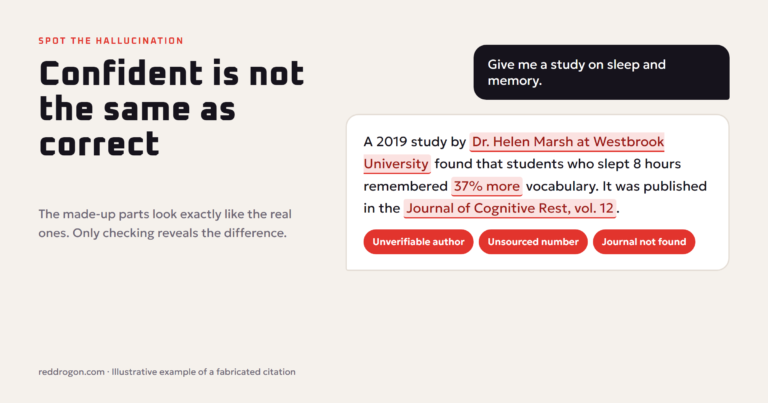
- Hallucinations. When a model lacks information it may guess. RAG grounds answers in real text, and good systems show the source so you can check. Our guide to ai hallucinations explains why grounding helps so much.
How RAG Works, Step by Step
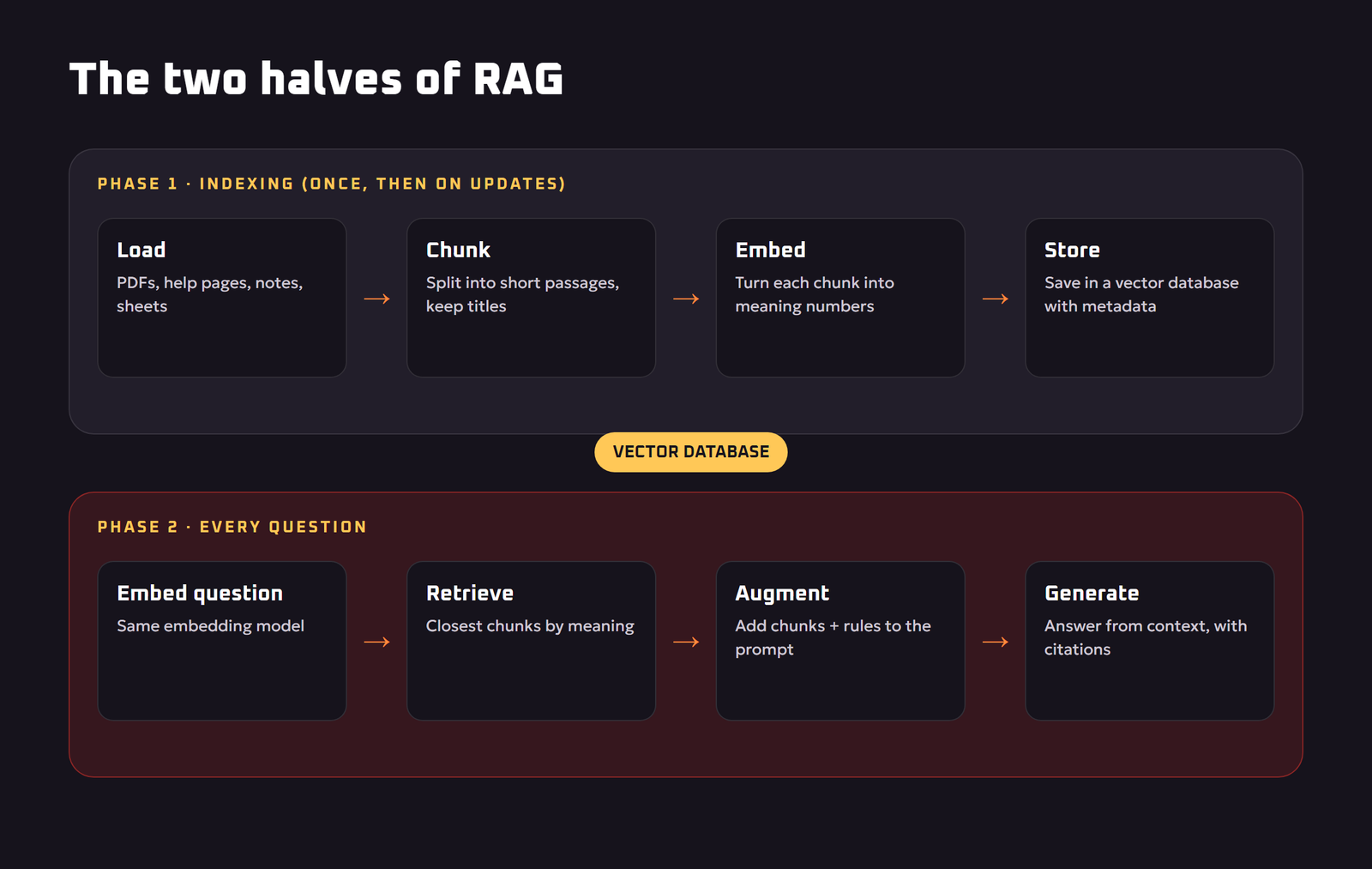
A RAG system has two phases: preparing your documents once, and answering questions as they come in.
Phase 1: Indexing your knowledge
- Load documents. Collect PDFs, web pages, help-desk articles, spreadsheets, notes and other files.
- Split into chunks. Long documents are cut into smaller passages, often a few paragraphs each, so the system can retrieve just the relevant part instead of a 100-page file.
- Create embeddings. Each chunk is turned into an embedding, a list of numbers that represents its meaning. Passages about similar topics get similar numbers, even if they use different words.
- Store in a vector database. The embeddings and the original text are saved in a database built for fast similarity search.
Phase 2: Answering a question
- Embed the question. Your question is turned into an embedding using the same model.
- Retrieve. The database finds the chunks whose embeddings are closest in meaning to the question, typically the top few.
- Augment the prompt. Those chunks are placed into the prompt along with instructions such as “Answer only from the context below. If the answer is not there, say you do not know.”
- Generate. The language model writes an answer based on the retrieved text, ideally with citations pointing to the source documents.
Because retrieval looks at meaning rather than exact keywords, a question like “Can I get my money back after 20 days?” can find a policy passage titled “Refunds and returns window”, even though the words do not match.
RAG vs Fine-Tuning vs Long Context
RAG is not the only way to teach a model new things. Here is how the main options compare.
| Approach | What it does | Best for | Weak spots |
|---|---|---|---|
| RAG | Looks up relevant documents at question time | Facts that change, private documents, answers with sources | Depends on good search; poor retrieval gives poor answers |
| Fine-tuning | Retrains the model on your examples | Style, tone, format, specialized tasks | Costly to update, poor at adding many new facts, no citations |
| Long context | Pastes whole documents into one prompt | One-off analysis of a few documents | Expensive and slower for large libraries, can miss details in the middle |
| Plain prompting | Relies only on the model’s training | General knowledge and creative tasks | No private or recent knowledge |
A practical rule: use RAG for knowledge and fine-tuning for behavior. Many real systems combine both, with a fine-tuned model that writes in the company’s style and RAG that supplies the facts.
Real-World Uses of RAG
- Customer support bots that answer from the current help center and return policy, and link to the article they used.
- Internal knowledge assistants that let employees ask questions about HR policies, product specs or engineering docs.
- Chat with your documents tools for students and researchers working through textbooks, papers and notes.
- Legal and compliance research that retrieves the exact clauses relevant to a question.
- Sales enablement assistants that pull product details, pricing rules and case studies into draft emails.
- Coding assistants that search your own codebase and documentation before suggesting changes. See our guide to ai for coding.
How to Build a Simple RAG System
You can try RAG today without writing code, or build your own with a few common tools.
No-code options
Many AI assistants let you upload files to a project or custom assistant and ask questions about them. Behind the scenes, many of these features use retrieval to find the right passages. No-code automation platforms also offer AI steps that can search a knowledge base, which we cover in our guide to ai automation for small business.
Developer stack
- Pick an embedding model from your AI provider or an open-source model.
- Choose a vector store. Options range from simple libraries and database extensions to dedicated vector databases.
- Write an ingestion script that loads files, chunks them, embeds them and stores them with metadata such as title, date and source link.
- Write the query flow: embed the question, retrieve the top chunks, build a prompt with clear rules, call the model, return the answer with sources.
- Evaluate with a set of real questions where you know the correct answer.
Popular open-source frameworks provide ready-made building blocks for each step. If your documents are private, you can even run the whole stack, including the language model, on your own computer. Our guide to run an llm locally shows how.
Why RAG Systems Give Bad Answers (and How to Fix Them)
Most RAG failures are retrieval failures. If the right passage never reaches the model, even the best model cannot answer correctly.
Bad chunking
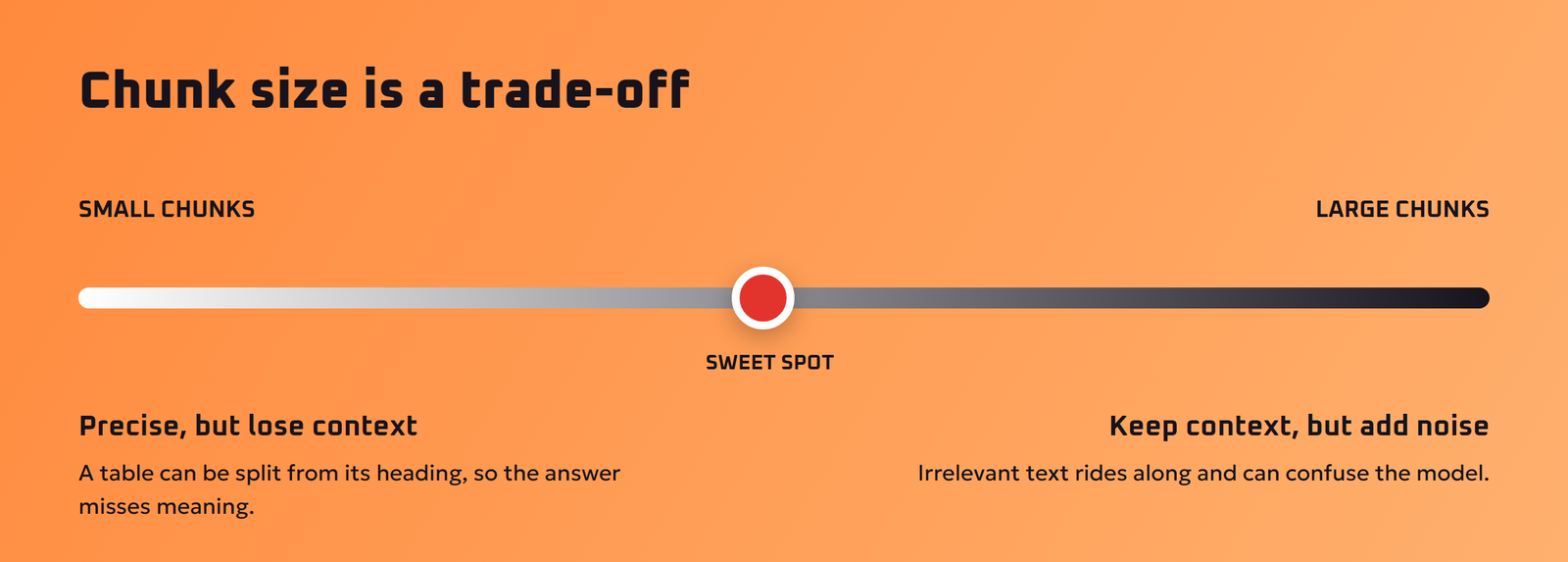
Chunks that are too small lose context, such as a table split from its heading. Chunks that are too large bring in irrelevant text that confuses the model. Fix: split on natural boundaries like headings and paragraphs, add a little overlap between chunks, and keep titles attached.
Messy source documents
Scanned PDFs, broken tables and duplicate or outdated files lead to wrong answers. Fix: clean the documents, remove old versions and add dates to metadata so newer information can be preferred.
Keyword gaps
Meaning-based search can miss exact codes, product numbers or names. Fix: use hybrid search, which combines vector search with traditional keyword search.
Retrieving too much or too little
Fix: retrieve a wider set of candidates, then use a reranker model to pick the best few before they go into the prompt.
The model ignores the context
Fix: give clear instructions to answer only from the provided text, to quote or cite sources, and to say “I don’t know” when the context lacks the answer. Our prompt engineering guide covers how to write these instructions.
No evaluation
Fix: build a test set of 30 to 100 real questions with known answers, and check both whether the right chunks were retrieved and whether the final answer is correct and properly sourced.
Advanced RAG Techniques
- Query rewriting: the AI rewrites a vague or conversational question into a better search query before retrieval.
- Metadata filters: limit search by date, department, product or language.
- Multi-step or agentic RAG: an agent decides when to search, searches several times, and combines results for complex questions. See our explainer on agentic ai.
- Graph-based RAG: stores entities and their relationships, which helps with questions that connect many facts across documents.
- Citations and highlighting: show users the exact passage behind each claim, which builds trust and makes checking easy.
Security and Privacy in RAG
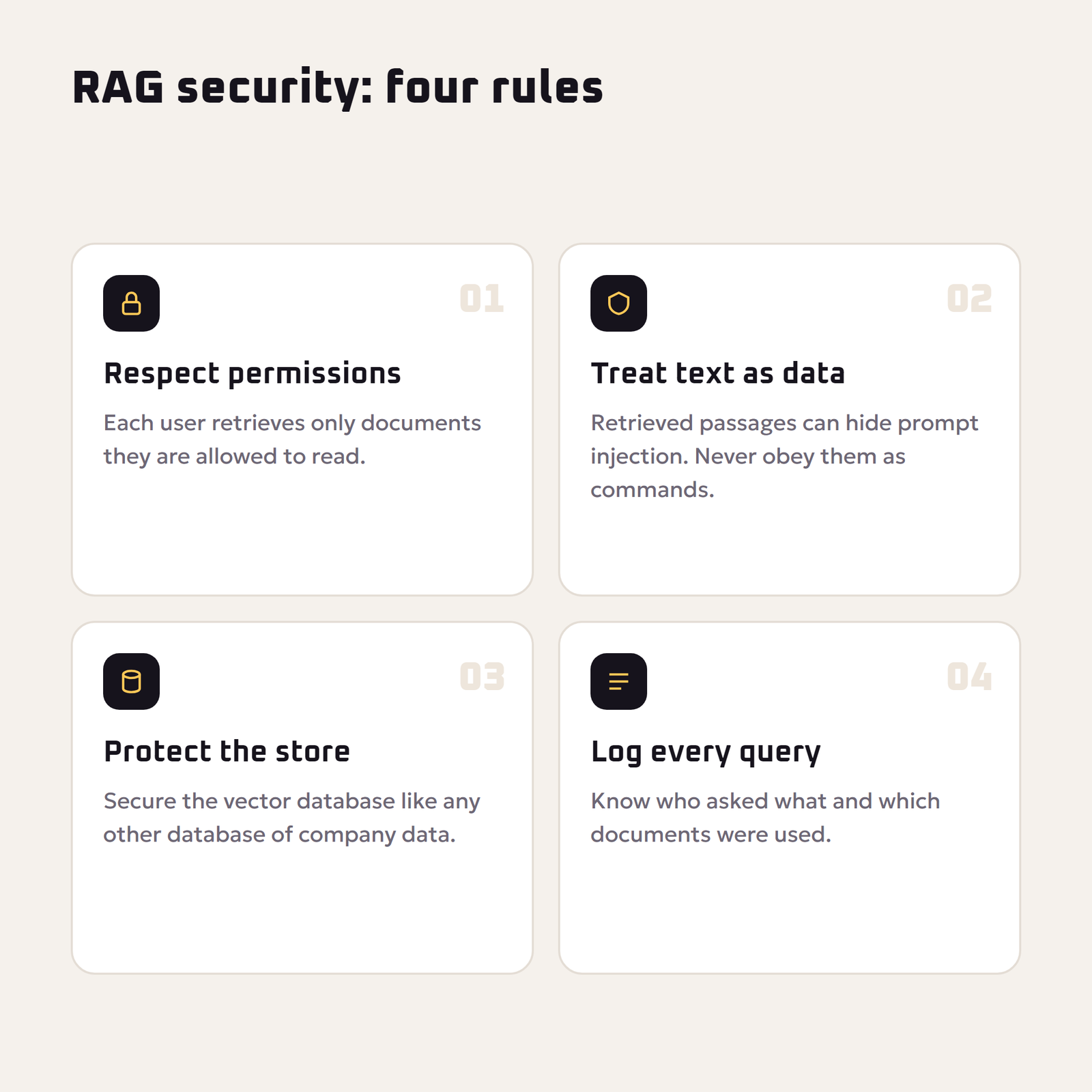
A RAG system can only be as safe as its access rules. If an intern’s question can retrieve the CEO’s salary file, the system leaks data. Respect document permissions at retrieval time, so each user only searches documents they are allowed to read.
Documents can also contain hidden instructions that try to manipulate the model, a form of prompt injection. The OWASP Top 10 for LLM Applications lists prompt injection, sensitive information disclosure, and vector and embedding weaknesses among the main risks. Treat retrieved text as data, not as commands, and keep logs of who asked what. For personal use, our ai privacy and safety guide explains what not to upload to online AI tools.
A Simple RAG Example, Start to Finish
Imagine a small online shop that wants a support assistant. Here is how RAG would handle one question.
- The knowledge base: the shop indexes its shipping policy, return policy, size guide and 40 product pages. Each document is split into short chunks with titles and dates attached.
- The question: a customer asks, “If my shoes don’t fit, can I swap them for a bigger size, and who pays shipping?”
- Retrieval: the system finds three chunks: the exchanges section of the return policy, the shipping costs table and the size guide note about running small.
- The prompt: those chunks are placed in the prompt with instructions to answer only from them, to keep the reply friendly and short, and to link the policy page.
- The answer: the assistant explains that exchanges are accepted within the policy window, states who pays shipping exactly as the policy says, suggests checking the size guide, and links the source.
Without RAG, a general chatbot would have to guess the shop’s rules. With RAG, the answer is specific, current and checkable. When the shop updates its policy, it only re-indexes the changed document. Nothing needs retraining.
How to Measure Whether Your RAG System Works
- Retrieval hit rate: for each test question, was the passage containing the right answer among the retrieved chunks?
- Answer correctness: is the final answer factually right according to your documents?
- Faithfulness: does every claim in the answer appear in the retrieved text, with nothing added?
- Citation accuracy: do the cited sources actually support the sentences they are attached to?
- Refusal quality: when the answer is not in the documents, does the system say so instead of guessing?
Track these numbers every time you change chunk size, the embedding model, the number of retrieved chunks or the prompt. Small changes can have surprisingly large effects, and measurement is the only way to know whether a change helped.
Questions to Ask Before Buying a RAG Product
- Does it show the source passage for every answer?
- Does it respect our existing file permissions?
- Can it handle our formats, such as scanned PDFs, spreadsheets and web pages?
- How quickly does it pick up new or changed documents?
- Can we test it on our own questions before we buy?
- Where is our data stored, and is it used for training?
Key Terms Explained
- Chunk: a short passage cut from a longer document for retrieval.
- Embedding model: a model that turns text into number lists representing meaning.
- Vector database: a store built to find embeddings that are closest in meaning to a query.
- Hybrid search: combining meaning-based vector search with traditional keyword search.
- Reranker: a model that reorders retrieved passages so the most relevant ones go into the prompt.
- Context window: the maximum amount of text a model can read in one request.
Key Takeaways
- RAG lets AI answer from your documents without retraining.
- Most RAG failures are retrieval failures, so invest in chunking and search.
- Tell the model to answer only from context and to cite sources.
- Measure retrieval and answer quality on real test questions.
- Respect document permissions at retrieval time.
If a vendor cannot answer these clearly, ask for a short pilot on a small set of your real documents. A week of testing with real questions tells you more than any product demo.
Frequently Asked Questions
What is RAG in AI?
RAG, or retrieval-augmented generation, is a method where an AI system searches a set of documents for relevant information, adds it to the prompt, and then generates an answer based on that information.
What is the difference between RAG and fine-tuning?
RAG looks up information at question time and is best for facts that change or private documents. Fine-tuning retrains the model on examples and is best for teaching a style, format or specialized behavior.
Does RAG stop hallucinations?
RAG reduces hallucinations by grounding answers in real documents, but it does not remove them completely. Clear instructions, good retrieval, citations and evaluation are still needed.
What is a vector database?
A vector database stores embeddings, which are number lists that represent the meaning of text, and quickly finds the entries closest in meaning to a question.
What are embeddings in RAG?
Embeddings are numerical representations of text meaning. Passages with similar meaning have similar embeddings, which lets a RAG system find relevant text even when the wording differs.
What is chunking in RAG?
Chunking is splitting long documents into smaller passages before embedding them, so the system can retrieve only the relevant part of a document instead of the whole file.
Can I build a RAG system without coding?
Yes. Many AI assistants let you upload files and ask questions about them, and no-code automation tools offer knowledge base search steps. Coding gives more control over chunking, search and evaluation.
Is RAG secure for company data?
It can be, if retrieval respects user permissions, the data store is protected, retrieved text is treated as data rather than instructions, and access is logged.
When should I not use RAG?
RAG is unnecessary for creative writing or general knowledge questions, and fine-tuning is often better when you need a consistent style or a narrow task rather than access to facts.
Final Thoughts
RAG gives AI the one thing it lacks most: access to the right information at the right moment. Index your documents carefully, retrieve well, tell the model to stay inside the evidence, show sources and measure results. Get those basics right and you can turn a generic chatbot into a trustworthy expert on your own knowledge. Tools in this space change quickly; this guide reflects common practice as of November 2026.