AI Automation for Small Business: What to Automate and How
Small business owners wear every hat at once: sales, support, marketing, bookkeeping and admin. Most of that work is not the reason you started the business. It is copying details from emails into spreadsheets, answering the same five questions, chasing invoices and posting on social media.
AI automation takes those repetitive tasks off your plate. Instead of a person moving information between apps and writing routine replies, a workflow does it automatically, with an AI step that can read, sort, summarize and draft like a human assistant. This guide shows what to automate first, which tools to use, how to build your first workflow step by step, how to measure the return, and how to avoid the mistakes that make automation backfire.
What Is AI Automation?
Traditional automation follows fixed rules: “When a form is submitted, add a row to this spreadsheet.” It is reliable but rigid. It cannot read an email and decide whether it is a complaint or a sales lead.
AI automation adds a language model step to the workflow. That step can understand unstructured text, such as emails, chat messages, reviews and documents, and turn it into something useful: a category, a summary, a draft reply, extracted data or a decision. The result is automation that handles messy, human input.
- Rule-based step: “If the invoice is more than 30 days overdue, send reminder template B.”
- AI step: “Read this customer email, decide if it is a refund request, a question or a complaint, and draft a friendly reply based on our policy.”
When AI is allowed to plan several steps on its own, it becomes an AI agent. Our guide to agentic ai explains the difference. For most small businesses, a clear workflow with one or two AI steps is the best place to start.
What to Automate First
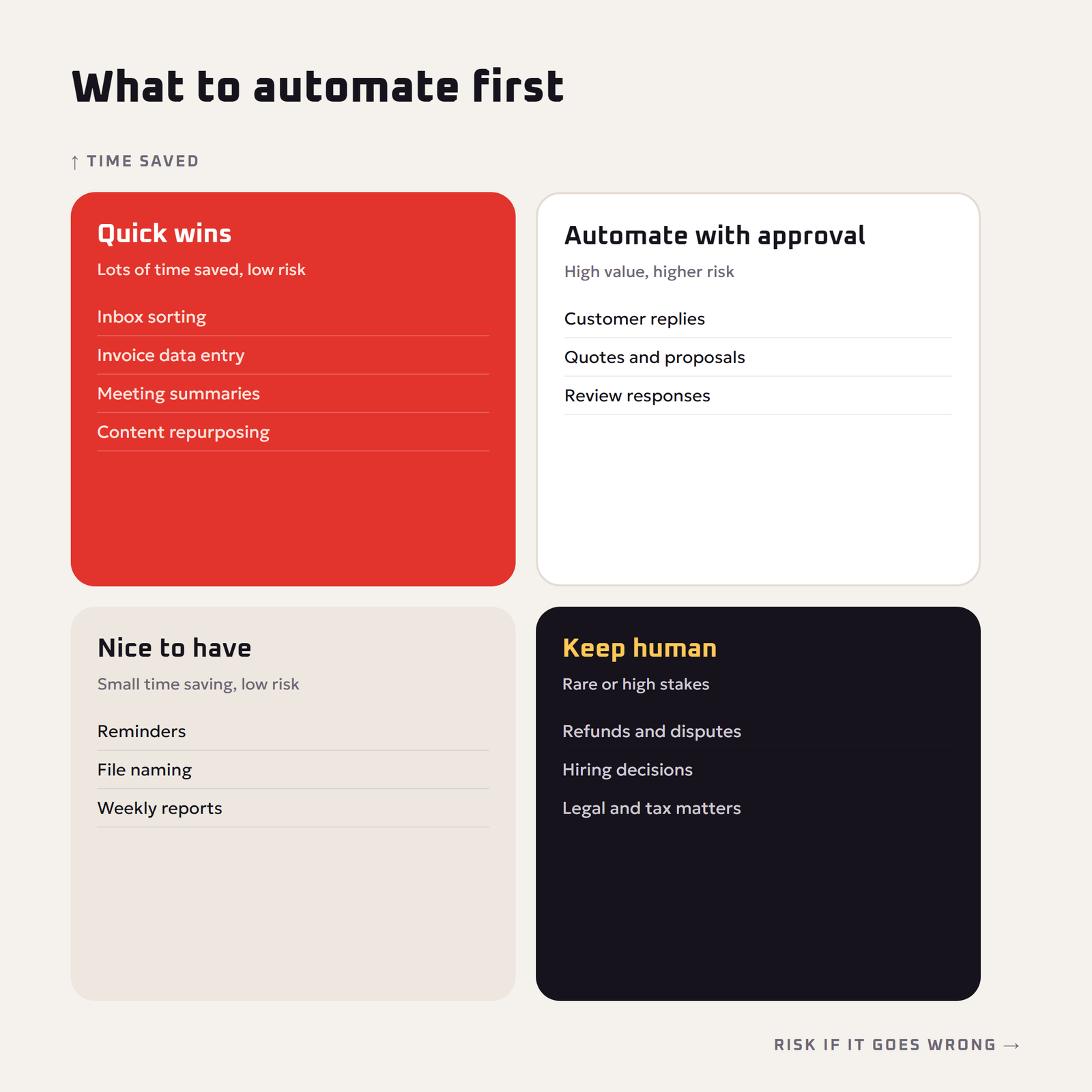
The best first automation is a task that is frequent, repetitive, rule-like and low-risk. Use this quick test: if you do it at least weekly, can explain it in a few steps, and a mistake would be annoying rather than harmful, it is a good candidate.
Top AI automation ideas by department
| Area | Automation | AI does |
|---|---|---|
| Sales | Lead capture and qualification | Reads form or email, scores the lead, summarizes needs, drafts a first reply |
| Customer support | Inbox triage | Tags messages by type and urgency, drafts answers from your FAQ |
| Marketing | Content repurposing | Turns one blog post into social posts, an email and a short video script |
| Reviews | Review monitoring | Summarizes new reviews, flags negative ones, drafts polite responses |
| Finance | Invoice and receipt processing | Extracts vendor, date, amount and category into your sheet or accounting app |
| Admin | Meeting notes | Summarizes calls, lists action items, sends them to the team |
| Hiring | Application screening | Summarizes applications against the job requirements for a human to review |
| Operations | Weekly reporting | Pulls numbers from several apps and writes a plain-language summary |
The Main AI Automation Tools
You do not need a developer. No-code automation platforms connect your apps with visual building blocks, and all of the major ones now offer AI steps.
| Tool | Strengths | Good fit for |
|---|---|---|
| Zapier | Very large library of app connections, beginner-friendly | Owners who want quick wins with popular apps |
| Make | Visual canvas, strong for branching, multi-step scenarios | More complex workflows at lower cost per step |
| n8n | Can be self-hosted, flexible, good AI and agent features | Tech-savvy teams who want control over data |
| Built-in app automations | AI features inside email, CRM, help desk and accounting tools | Simple tasks inside one app |
Prices and plans change often, so compare the current pricing pages and start with a free tier or trial. Pick the tool that already connects to the apps you use every day.
How to Build Your First AI Workflow: Step by Step
Let’s build a common, high-value workflow: automatic lead handling for a service business.
- Map the manual process. Write down exactly what you do now: a contact form arrives, you read it, decide if it is a real lead, copy the details into a spreadsheet, and write a reply.
- Set the trigger. In your automation tool, choose “new form submission” or “new email in the leads inbox” as the starting event.
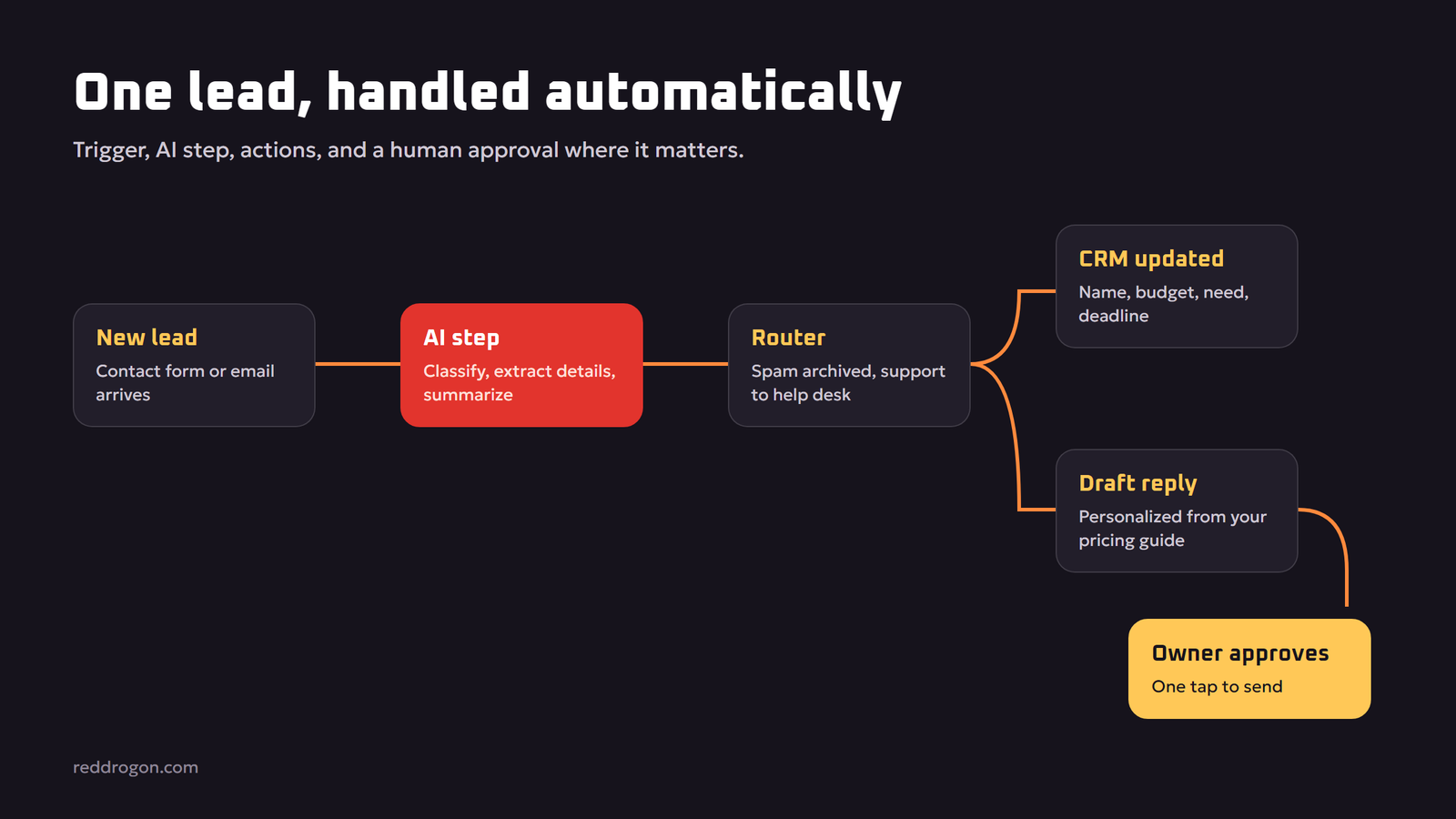
- Add the AI step. Send the message to an AI step with a clear prompt: “Classify this inquiry as hot lead, cold lead, spam or support. Extract name, company, budget, service needed and deadline. Summarize the request in two sentences. Return the result as JSON.” Our prompt engineering guide shows how to write prompts that give consistent output.
- Route by result. Add a filter or router: spam is archived, support goes to the help desk, leads continue.
- Update your records. Add the extracted details to your CRM or spreadsheet.
- Draft, don’t send. Have AI draft a personalized reply based on your services and pricing guide, and save it as a draft or send it to you for approval.
- Notify the owner. Send a short message to your phone or team chat with the summary and a link to the draft.
- Test with real past examples. Run 10 to 20 old inquiries through the workflow and compare the results with what you would have done.
- Go live and review weekly. Check a sample of results every week and improve the prompt where it gets things wrong.
Once the drafts are consistently good, you can let low-risk replies, such as “thanks, we received your message”, send automatically, while keeping quotes and anything involving money for approval.
Give AI Your Business Knowledge
An AI step only knows what you give it. For support and sales, include your services, prices, policies and FAQs in the prompt, or connect a knowledge base the AI can search. Searching your own documents before answering is called retrieval-augmented generation, explained in our guide to retrieval augmented generation. It is the difference between a generic reply and one that sounds like your business.
How to Measure the Return on AI Automation
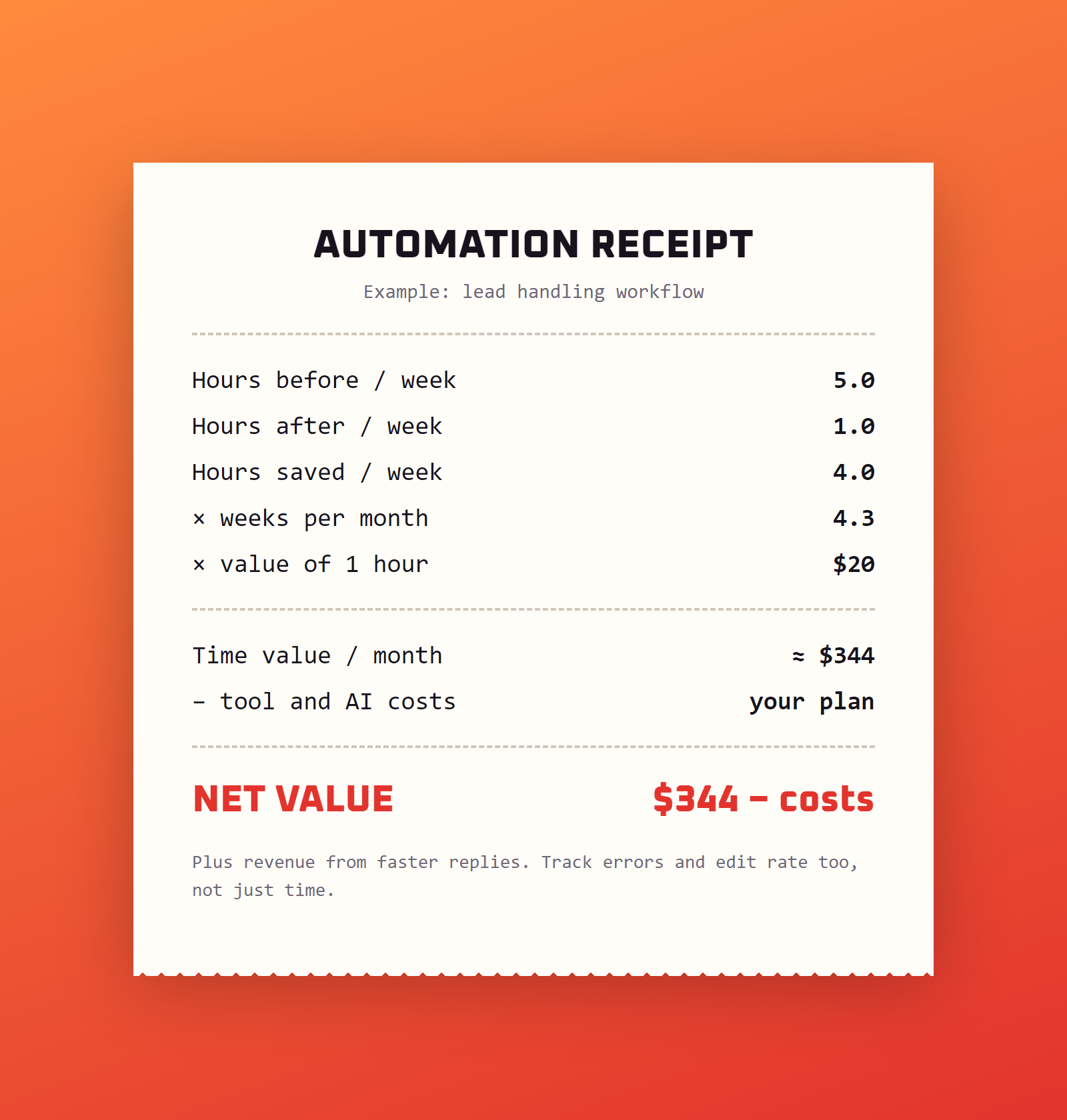
Use a simple formula for each workflow:
Monthly value = (hours saved per week × 4.3 × value of one hour) + extra revenue − monthly tool costs
For example, if lead handling used to take 5 hours a week and now takes 1, you save 4 hours a week, about 17 hours a month. If an hour of your time is worth 20 dollars, that is roughly 340 dollars of time each month, before counting the extra sales you win by replying faster. Compare that with the cost of the tools and AI usage.
Also track quality, not just time:
- Response time to leads and customers
- Error rate, such as wrong categories or wrong details extracted
- How often you edit AI drafts before sending
- Customer satisfaction and review ratings
Common AI Automation Mistakes
- Automating a broken process. If the manual process is messy, automation makes it messy faster. Simplify first.
- Starting too big. Begin with one workflow, prove it works, then add the next.
- Letting AI send everything. Keep a human approval step for quotes, refunds, complaints and anything legal or financial.
- Vague prompts. Inconsistent prompts give inconsistent results. Define exact categories and output formats.
- Trusting AI facts. AI can invent prices, dates or policy details. Ground it in your documents and check. Our guide to ai hallucinations explains why.
- No monitoring. Workflows break silently when an app changes. Set up error alerts.
- Ignoring data privacy. Sending customer data to AI services has legal and trust implications.
Data Privacy and Responsible Use
Customer names, emails, phone numbers and payment details are personal data. Before connecting them to an AI workflow:
- Check where each tool stores and processes data, and whether the AI provider may use it for training.
- Send only the fields the AI step needs. A lead classifier does not need a customer’s payment details.
- Follow the privacy laws that apply to you and your customers, and update your privacy policy if needed.
- Be honest in marketing. In February 2023 the US Federal Trade Commission warned businesses to keep their AI claims in check, so do not exaggerate what your AI does.
- For sensitive data, consider tools you can self-host, or running an AI model on your own hardware, as shown in our guide to run an llm locally.
Our ai privacy and safety guide has more practical rules you can share with your team.
A 30-Day AI Automation Plan
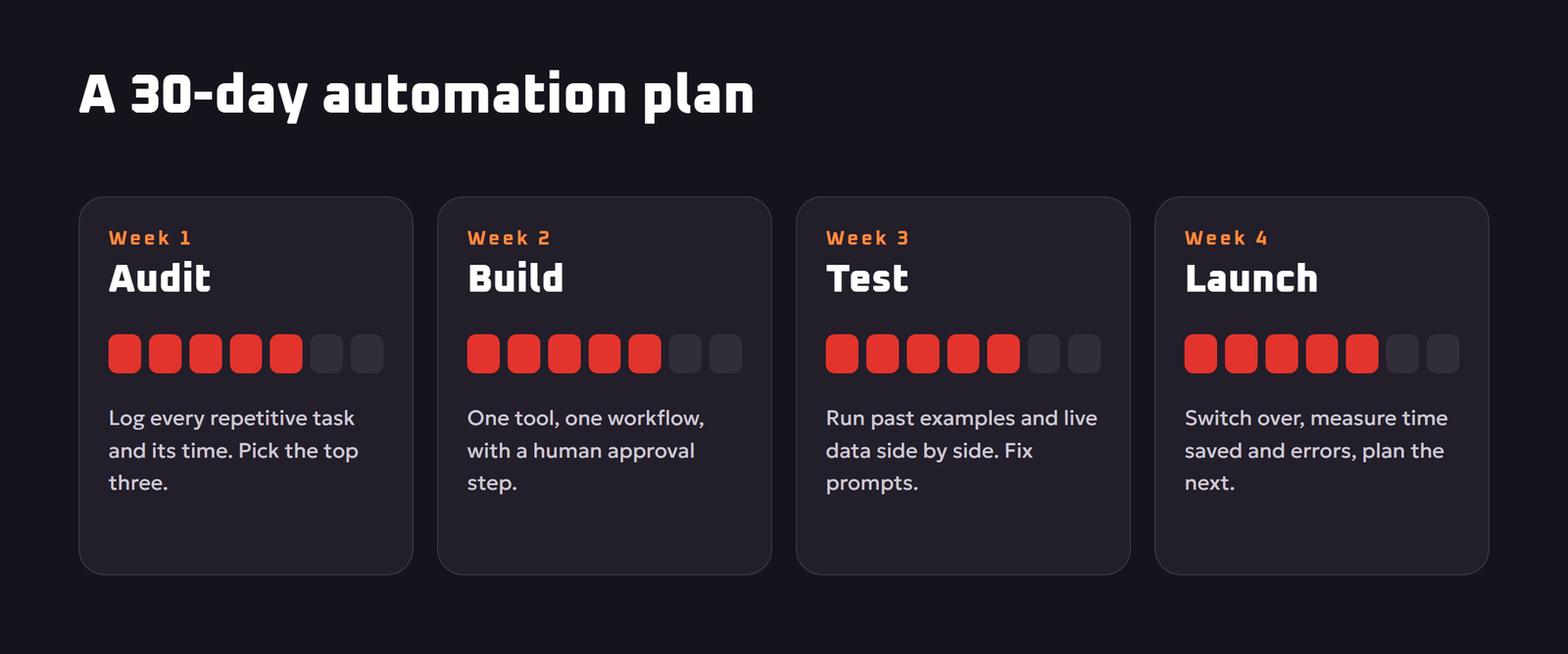
- Week 1: Audit. For one week, write down every repetitive task and how long it takes. Pick the top three by time saved and low risk.
- Week 2: Build. Choose one tool and build your first workflow with a human approval step.
- Week 3: Test. Run it on past examples and live data in parallel with your manual process. Fix prompts and routing.
- Week 4: Launch and measure. Switch over, track time saved and errors, then plan the next workflow.
Repeat the cycle every month. Within a few months, a small business can have a set of quiet digital assistants handling hours of routine work every week.
Five Ready-to-Copy Automation Recipes
1. Review responder
Trigger: a new review on your business profile. AI step: summarize the review, rate the sentiment and draft a polite reply that thanks the customer and addresses any problem. Action: send the draft to you for approval, and alert you immediately for one- or two-star reviews.
2. Invoice data entry
Trigger: a new invoice or receipt email with an attachment. AI step: extract supplier, date, amount, tax and category. Action: add a row to your expenses sheet or accounting app and file the attachment in the right folder.
3. Content repurposing
Trigger: a new blog post is published. AI step: write three social posts, one newsletter paragraph and one short video script based on the post. Action: save them as drafts in your scheduling tool for review.
4. Meeting follow-up
Trigger: a meeting transcript is saved. AI step: summarize decisions, list action items with owners and deadlines. Action: email the summary to attendees and add tasks to your project board.
5. Appointment reminders with a personal touch
Trigger: an appointment is booked for tomorrow. AI step: write a short, friendly reminder that mentions the service booked and any preparation needed. Action: send it by email or text at a set time.
Each recipe follows the same shape: one trigger, one AI step with a clear prompt, one or two actions, and a human check where the stakes are higher. Once you understand that shape, you can design your own.
When Not to Automate
- Rare tasks. If something happens twice a year, building and maintaining an automation costs more time than it saves.
- Relationship moments. Apologizing to an upset long-term client or negotiating a big deal deserves your personal attention.
- High-risk decisions. Legal, medical, hiring and large financial decisions should stay with qualified people, with AI only as a helper.
- Unclear processes. If you cannot explain how the task should be done, the AI cannot either.
Questions to Ask Before Choosing an Automation Tool
- Does it connect to the apps I already use, such as my email, CRM, booking system and accounting software?
- How is usage counted? Some tools charge per task or per step, so a busy workflow can cost more than expected.
- Where is my data processed and stored, and can I keep sensitive data out of AI steps?
- Can I add approval steps and error alerts without writing code?
- Is there a free tier or trial long enough to test one real workflow end to end?
Key Terms Explained
- Trigger: the event that starts a workflow, such as a new email, a form submission or a time of day.
- Action: a step the workflow performs, such as adding a row to a sheet, sending a message or creating a task.
- AI step: a workflow step that sends text to a language model to classify, summarize, extract or draft.
- Router or filter: a step that sends items down different paths depending on a condition, such as lead or spam.
- Human in the loop: a deliberate approval step where a person checks AI output before it is sent or acted on.
- Self-hosting: running an automation tool on your own server instead of the vendor’s cloud, for more control over data.
- Webhook: a web address that lets one app instantly notify another when something happens.
Key Takeaways
- Automate frequent, repetitive, low-risk tasks first.
- Give AI steps precise prompts and your real business knowledge.
- Keep a human approval step for money, promises and complaints.
- Measure hours saved, errors and response times every month.
- Send only the customer data each step actually needs.
Frequently Asked Questions
What is AI automation for small business?
AI automation connects your business apps into workflows that run on their own, with AI steps that can read emails and documents, sort them, extract information and draft replies, so routine work happens without manual effort.
What should a small business automate first?
Start with frequent, repetitive, low-risk tasks such as lead capture, inbox sorting, data entry from forms or invoices, meeting summaries and social media repurposing.
Do I need coding skills for AI automation?
No. No-code platforms such as Zapier, Make and n8n let you build workflows with visual blocks and add AI steps using plain-language prompts.
Is Zapier, Make or n8n better?
Zapier is the easiest for beginners with popular apps, Make is strong for complex visual workflows, and n8n suits teams that want flexibility and the option to self-host. Choose based on the apps you use and your budget.
How much does AI automation cost?
Costs depend on the platform plan, the number of tasks you run and AI usage. Many tools offer free tiers or trials, so start small and compare the monthly cost with the hours saved.
Can AI automation reply to customers automatically?
Yes, but it is safest to start with AI drafts that a person approves. Allow automatic sending only for simple, low-risk messages once results are consistently accurate.
Is it safe to use customer data in AI workflows?
It can be, if you send only the necessary data, check how each provider stores and uses it, follow applicable privacy laws and keep sensitive steps under human control.
How do I measure the ROI of automation?
Multiply hours saved per week by about 4.3 and by the value of an hour, add any extra revenue, and subtract monthly tool costs. Also track response time, errors and customer satisfaction.
What is the difference between AI automation and AI agents?
AI automation follows a workflow you design with AI steps inside it. AI agents decide their own steps toward a goal. Most small businesses should start with designed workflows and add agents later.
Final Thoughts
AI automation is one of the highest-return investments a small business can make in its own time. Start with one frequent, low-risk task, give the AI clear instructions and your real business knowledge, keep humans in charge of money and promises, and measure the hours saved. Build one workflow a month, and the routine work that used to fill your evenings will quietly take care of itself. Tool features and prices mentioned in this guide reflect November 2026; check each provider for current details.